Buying a restaurant POS system often starts with software.
But eventually, someone has to answer a much more physical question:
What equipment do we actually need?
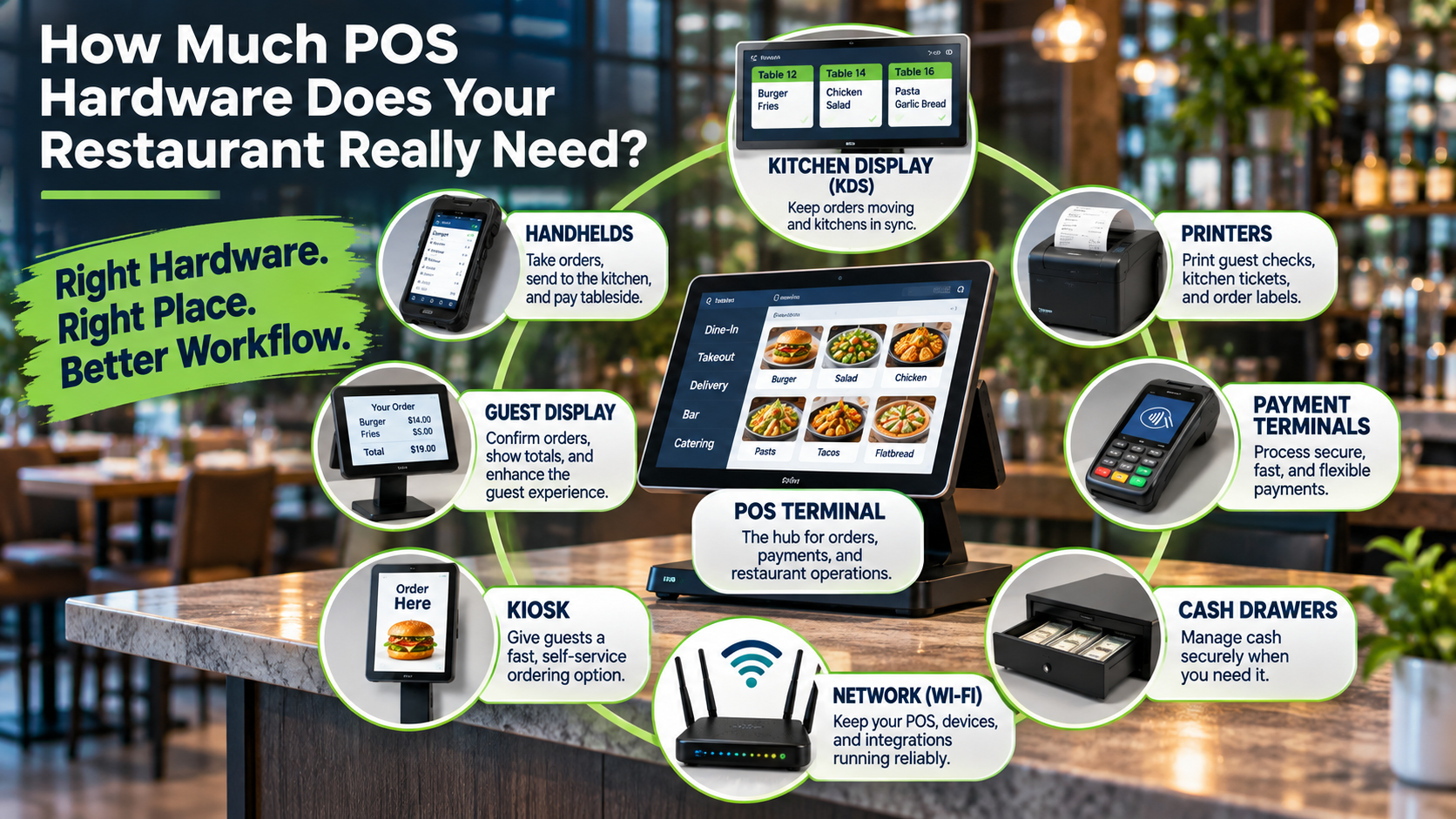
A restaurant can quickly end up with terminals, handhelds, payment devices, printers, kitchen displays, guest-facing screens, cash drawers, kiosks, networking equipment, and charging stations.
Some of it may be essential.
Some may dramatically improve operations.
Some may turn into expensive hardware that barely gets used.
The goal isn’t to install as much technology as possible.
It’s to put the right hardware in the right places for the way the restaurant actually operates.
Here’s how to think through it.
1. Start With the Workflow
Before deciding how many terminals or handhelds to buy, map the way orders move through the restaurant.
Ask:
- Where are orders entered?
- Where are payments taken?
- Where do guests wait?
- Where does food get produced?
- Where do bartenders work?
- How far do servers walk?
- Does the restaurant offer takeout?
- Is there outdoor seating?
- Are there multiple dining areas?
- Is there a separate pickup counter?
Hardware should support that workflow.
A small counter-service restaurant may operate perfectly with one or two terminals.
A high-volume full-service restaurant may benefit from fixed terminals plus handhelds.
A bar may need strategically placed terminals at several service points.
Start with operations.
Then choose the hardware.
2. Fixed POS Terminals
The traditional POS terminal is still the center of many restaurant setups.
Fixed terminals are particularly useful when employees need:
- A large screen
- Fast order entry
- Cash-drawer access
- Receipt printing
- Manager functions
- Detailed check management
The question is usually not whether you need one.
It’s how many and where to place them.
A common mistake is placing terminals wherever there's power or counter space.
Instead, consider employee movement.
If six servers regularly wait behind one another to use the same terminal, you may not have enough access.
If a terminal sits unused in a corner all night, you may have too much.
Good hardware placement should reduce employee travel and bottlenecks.
3. Handheld POS Devices
Handhelds can significantly change restaurant workflows.
Servers may be able to:
- Enter orders tableside.
- Send items directly to the kitchen.
- Process payments.
- Split checks.
- Add tips.
- Move between dining areas.
The biggest potential benefit isn’t that handhelds look modern.
It’s that they can remove unnecessary trips back and forth to fixed terminals.
But handhelds aren’t automatically right for every restaurant.
Consider:
- Wi-Fi coverage
- Device weight
- Battery life
- Charging
- Employee comfort
- Tableside interaction
- Payment workflow
- Outdoor use
You also need enough devices to make them useful.
Sharing two handhelds among ten servers may create more frustration than efficiency.
4. Payment Terminals
Payment hardware deserves separate consideration from the POS terminal itself.
Depending on your setup, payment devices may be:
- Attached to fixed terminals
- Standalone
- Built into handhelds
- Guest-facing
- Mobile
The right option depends heavily on service style.
A counter-service restaurant may want a guest-facing payment device.
A full-service restaurant may benefit from tableside payments.
A bar may need fast access to several devices.
Also consider:
- Contactless payments
- Chip cards
- Digital wallets
- Offline capabilities
- Tip prompts
- Signature workflows
Payment hardware is one of the most frequently handled devices in the restaurant.
Ease of use matters.
5. Guest-Facing Displays
Guest-facing displays can be useful in counter-service environments.
They may show:
- Items as they’re entered
- Prices
- Order totals
- Loyalty prompts
- Tip options
- Payment information
One important benefit is order confirmation.
Guests can see what is being entered before the transaction is completed.
That may help catch:
- Missing items
- Incorrect quantities
- Wrong modifiers
before the order reaches the kitchen.
But if your service model doesn’t involve guests standing at a POS terminal, a customer-facing display may provide little value.
6. Receipt Printers
Receipt printers are not particularly exciting.
They're still important in many restaurants.
You may need them for:
- Guest receipts
- Merchant copies
- Takeout orders
- Bar tickets
- Pickup labels
- Administrative printing
Think about where printing actually needs to happen.
You may not need a printer next to every POS terminal.
In other restaurants, sharing one printer between several stations could become a bottleneck.
Also pay attention to connectivity.
A printer that frequently disconnects can cause significant operational disruption.
7. Kitchen Printers
Kitchen printers remain common because they are simple and familiar.
A ticket prints.
The kitchen makes the food.
Placement matters, so does routing.
Different stations may need different tickets.
For example:
Bar → beverages
Fry station → fried items
Hot line → entrées
Pantry → salads and desserts
Adding more printers does not automatically improve communication.
The goal is to send the right information to the right station without creating unnecessary paper.
8. Kitchen Display Systems
Kitchen display systems, or KDS, replace or supplement printed tickets with digital screens.
They can provide advantages such as:
- Order timing
- Item routing
- Course management
- Order status
- Bump tracking
- Production visibility
But KDS hardware needs thoughtful placement.
Employees need to see and interact with the screens while working.
Consider:
- Screen size
- Mounting height
- Heat exposure
- Grease
- Touch access
- Power
- Network connectivity
A beautifully configured KDS isn’t very useful if the screen is mounted somewhere cooks cannot comfortably use it.
9. Cash Drawers
Restaurants process less cash than they once did, but many still need cash drawers.
Think about:
- How many employees handle cash
- Whether drawers are assigned
- Whether bartenders need separate drawers
- Whether each drawer needs its own terminal
- Who can open the drawer?
Avoid installing more cash drawers than you actually need simply because they were traditionally included with POS stations.
Every piece of equipment adds cost and another item to manage.
10. Self-Service Kiosks
Kiosks can make sense for certain restaurant concepts.
They may allow guests to:
- Browse the menu
- Customize orders
- Pay
- Enter loyalty information.
- Send orders directly to production.
Kiosks aren't just large POS terminals turned toward the customer.
They create their own guest workflow.
Before adding one, consider:
- Where guests will stand
- How lines will form
- Accessibility
- Menu design
- Payment hardware
- Receipt needs
- What happens when a guest needs help
A kiosk should make ordering easier. If employees spend half the shift helping customers use it, the workflow may need more thought.
11. Don’t Forget Charging Infrastructure
Mobile hardware needs somewhere to live.
- Handhelds.
- Tablets.
- Mobile payment devices.
If employees begin each shift searching for a working charger, your hardware plan is incomplete.
Create dedicated charging locations.
They should be:
- Easy for staff to access
- Organized
- Protected from spills
- Close to where devices are used
- Able to charge enough equipment simultaneously
Also consider spare devices.
A restaurant that depends entirely on handhelds may want enough redundancy to handle a damaged or dead unit.
12. Network Hardware Is POS Hardware Too
It may not have your POS company’s logo, but your network infrastructure is part of the system.
That can include:
- Router or firewall
- Network switches
- Wireless access points
- Cabling
- Cellular backup
This becomes particularly important with:
- Handhelds
- Kitchen displays
- Network printers
- Cloud-based POS systems
- Online ordering
- Payment devices
Spending thousands of dollars on restaurant technology while relying on inadequate networking is a poor trade-off. Your POS hardware can only communicate as reliably as the network it connects to.
13. Plan for the Environment
Restaurants are not gentle environments for electronics.
Hardware may be exposed to:
- Heat
- Steam
- Grease
- Liquids
- Food
- Dust
- Constant handling
Think carefully about where you install devices.
A network switch should not live beside a mop sink.
Don't mount a kitchen display somewhere exposed to excessive heat.
A POS terminal should not sit where every spilled drink lands.
Sometimes reliability comes down to simple physical placement.
14. Consider Cable Management
Technology installations tend to grow over time.
What begins as:
POS + printer + payment device
can eventually become:
POS + printer + payment device + guest display + scanner + network cable + power strip + charging cable + mystery cable nobody wants to unplug.
Plan cable management from the beginning.
Label important cables.
Keep power supplies organized.
Avoid creating tangled piles of equipment under counters.
Clean installations are easier to troubleshoot and maintain.
15. Know Who Owns the Hardware
This is especially important when evaluating POS agreements.
Hardware may be:
- Purchased
- Financed
- Leased
- Provided as part of a processing agreement
Understand which applies.
Ask:
- Do we own this equipment?
- What happens if we cancel?
- Can we reuse it with another POS?
- Who replaces it if it fails?
- Is there a warranty?
- Are replacement devices included?
A low upfront price may be tied to a longer-term agreement.
Know the relationship before signing.
16. Keep a Hardware Inventory
Once installed, document your equipment.
A simple inventory might include:
Device Type
Location
Serial Number
Purpose
Vendor
Install Date
Warranty
This becomes extremely useful later.
When a device fails, you know what it is.
When equipment is replaced, you know what changed.
When planning another location, you have a reference for what worked.
17. Have a Replacement Plan
Hardware does not last forever.
You don’t necessarily need to replace everything on an arbitrary schedule.
You should know which equipment would create the biggest problem if it failed.
Ask:
- Do we have a spare payment terminal?
- Can servers share terminals if one dies?
- Is there a backup kitchen printer?
- What happens if a handheld breaks?
- How quickly can replacements arrive?
The more critical a device is to service, the more important redundancy becomes.
More Hardware Isn’t Always Better
It’s easy to overbuild a technology package.
Another terminal sounds useful.
Another printer seems safe.
Another KDS screen might help.
But every device carries:
- Purchase cost
- Installation cost
- Network requirements
- Power requirements
- Maintenance
- Support
- Replacement cost
Ask what operational problem each device solves.
If you cannot answer that clearly, you may not need it.
But Too Little Hardware Has a Cost Too
Underbuilding creates different problems.
Servers queue for terminals.
Employees share payment devices.
Kitchen tickets bottleneck at one printer.
Handhelds run out of battery with no spares.
The least expensive hardware configuration isn’t necessarily the most cost-effective one.
Saving $500 on equipment may make little sense if it creates daily inefficiency for years.
The Bottom Line
Restaurant POS hardware should be designed around workflow.
Not around a standard equipment package.
Not around what another restaurant uses.
And not around how many devices a salesperson can put on a quote.
Look at how employees take orders.
How guests pay.
How food reaches the kitchen.
Where people move.
Where bottlenecks occur.
Then place technology where it removes friction.
The right POS hardware setup isn’t the one with the most equipment. It’s the one where every device has a reason to be there.
Planning or Updating Your Restaurant POS Hardware?
Tillify Technologies helps restaurants plan and install point-of-sale environments around the way the operation actually works.
From POS terminals and handhelds to payment devices, printers, kitchen systems, networking, and installation, hardware decisions should support the restaurant, not get in its way.
Good restaurant technology starts with putting the right equipment in the right place.
Comments